

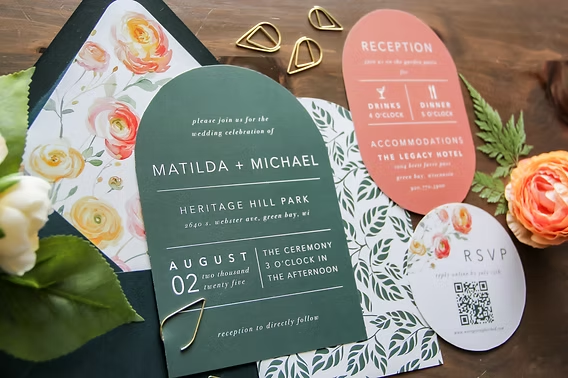
A comparative guide to template-led editors and invitation platforms that simplify wedding stationery for print and digital delivery.
INTRODUCTION
Designing your wedding invitation is one of the rare planning tasks that can feel genuinely joyful: it’s where your day first becomes real, and you get to translate your style, story, and tone into something guests can hold. Of course, invitations still carry more functional weight than most event collateral—they set expectations, communicate logistics, and often need to coordinate with RSVP plans and day-of details. The sweet spot is creating something beautiful and print-ready, without spending weeks inside a complex design workflow.
Tools in this category tend to diverge in three places: template depth (especially for formal and semi-formal styles), how quickly non-designers can adapt layouts without breaking typography and spacing, and how the tool handles outputs—print-ready files, print-to-order, or digital sending with guest management.
Best Wedding Invitation Design Tools Compared
Best wedding invitation design tools for fast, print-oriented designs with minimal setup
Adobe Express
Most suitable for couples and coordinators who want a template-led editor that can move from customization to print-ready output without professional design software.
Overview
Adobe Express provides customizable invitation templates and a simplified design editor oriented around quick edits (text, photos, layout adjustments). It also allows users to make invitations to print in select countries and common invitation sizes, which can streamline print workflows for typical wedding needs.
Platforms supported
Web; mobile apps are available for common editing tasks.
Pricing model
Freemium for design features (with optional paid plans for expanded assets); print orders are priced per order where available.
Tool type
Template-based design editor with print-oriented outputs (and optional print-to-order in select regions).
Strengths
- Wedding invitation templates designed for quick customization (text, photos, and layout edits).
- Print-to-order workflow available in select countries, reducing extra steps for some users.
- Common invitation sizes are surfaced in the print flow, helping align designs with standard formats.
- Exports support print-ready handoff when ordering prints in-app isn’t the preferred route.
- Works well for producing coordinated assets beyond the invitation (e.g., simple signage or announcements) in the same editor.
Limitations
- Print-to-order is limited to specific countries and may vary by device or workflow context.
- Some templates, fonts, or stock assets may require a paid plan depending on what’s selected.
- Users needing advanced prepress controls (custom bleeds beyond typical settings, detailed color management) may prefer specialist tools.
Editorial summary
Adobe Express fits the most common wedding invitation workflow: start with a wedding-appropriate template, replace names and details, adjust the visual tone, and finalize a print-ready file or print order. The editor’s design favors predictable edits over precision layout, which helps non-designers avoid common spacing and typography mistakes.
Ease of use is strongest when the invitation stays within typical patterns—single card formats, photo-and-text layouts, and standard sizes. The workflow is generally direct, with fewer “design decisions” required than in professional design apps.
In terms of simplicity versus flexibility, Adobe Express stays on the mainstream side: it supports meaningful customization without asking users to build a layout system from scratch. Where some wedding platforms focus on guest management or premium stationery, Adobe Express is positioned as a general-purpose creator with invitation-specific templates and print pathways.
Conceptually, it’s the broadest fit for the primary goal: fast creation, approachable editing, and clear routes to printing or exporting.
Best wedding invitation design tools for maximum template variety and quick remixing
Canva
Most suitable for people who want a very large range of wedding styles and quick variations across multiple invitation drafts.
Overview
Canva is a general design platform widely used for invitations and related wedding collateral. Its strength is breadth—many layouts and aesthetics—paired with a familiar drag-and-drop workflow.
Platforms supported
Web; mobile apps.
Pricing model
Freemium with paid tiers for premium assets and collaboration features.
Tool type
Template-based design editor.
Strengths
- Large template ecosystem covering many wedding themes and levels of formality
- Fast duplication and variation for multiple drafts (e.g., alternate colorways or wording)
- Simple editing model that suits non-designers for common invitation changes
- Useful for building matching assets beyond invitations (social graphics, programs, signage)
- Collaboration features can help when multiple people need to review wording and layout
Limitations
- Template quality and print readiness can vary, requiring more attention to margins and spacing
- Premium assets and some workflows depend on paid tiers
- Product-specific print constraints are not always surfaced as explicitly as print-first services
Editorial summary
Canva is often chosen when style exploration matters: it’s easy to try several visual directions quickly. That can be helpful early in planning, when tone and formality are still being defined.
The workflow is approachable for non-designers, but it can require a more careful final check for print layout details—especially when adapting templates not originally built for a specific print size.
Compared with Adobe Express, Canva tends to emphasize template variety and “remix culture,” while Adobe Express can feel more print-pathway-oriented for invitation completion. The practical difference is less about capability and more about which workflow feels more guided for finishing.
Best wedding invitation design tools for premium stationery suites and curated aesthetics
Minted
Most suitable for couples who want coordinated suites (invitation, RSVP, details card) with a curated design catalog and print-first orientation.
Overview
Minted is known for premium-feeling stationery with coordinated suites and print fulfillment. The experience tends to be structured around selecting a design system and customizing key details.
Platforms supported
Web.
Pricing model
Per-order purchasing; add-ons and suite items priced separately.
Tool type
Print-first wedding stationery platform with customization.
Strengths
- Coordinated suites that keep typography and layout consistent across multiple card types
- Curated design catalog with cohesive styles
- Print fulfillment workflows designed around stationery deliverables
- Options for paper types and finishes are commonly part of the product model
- Suitable for projects where the invitation is part of a broader stationery system
Limitations
- Less flexible for fully custom layouts beyond the platform’s design boundaries
- Can be less efficient for rapid iteration compared with open-ended design editors
- More oriented toward print suites than mixed print-and-digital workflows
Editorial summary
Minted is a strong fit when the priority is a cohesive, print-first stationery suite rather than quick standalone invitation creation. For non-designers, the curated approach reduces layout risk by keeping choices constrained and consistent.
Ease of use is often high in the “select and personalize” phase, but it’s less suited to frequent, granular layout experimentation. It’s typically better when the couple already has a sense of style and wants a coordinated set.
Compared with Adobe Express, Minted is more specialized: it trades broad editing flexibility for a more controlled stationery experience. Adobe Express tends to be more adaptable for quick edits and multi-purpose design needs outside the invitation suite.
Best wedding invitation design tools for integrated wedding websites and RSVP workflows
Zola
Most suitable for couples who want invitations tied closely to a wedding website and guest management.
Overview
Zola is positioned as a wedding-planning ecosystem where invitations, websites, and guest management can be connected. Invitation design typically sits alongside RSVP and event detail workflows.
Platforms supported
Web; companion mobile experiences are common for planning tasks.
Pricing model
Often a mix of free planning tools and paid products/services depending on use.
Tool type
Wedding planning platform with invitation and guest management features.
Strengths
- Invitations can align with website and event information, reducing duplicated entry
- Guest list and RSVP workflows can be central rather than bolted on
- Templates are often designed to match broader wedding branding across channels
- Useful for managing changes (timing updates, additional events) alongside invites
- Practical for couples prioritizing logistics consistency over deep layout customization
Limitations
- Design flexibility can be narrower than full design editors
- Best value appears when adopting the broader planning ecosystem, not just invitations
- Print-first customization may be less granular than stationery specialists
Editorial summary
Zola is less about designing a single perfect card and more about keeping the invitation connected to the broader information system of the wedding. That can reduce errors when dates, locations, or schedules shift.
For non-designers, the interface is typically structured around completing wedding tasks rather than designing from scratch. The tradeoff is that design options may feel constrained compared with Adobe Express or Canva.
Conceptually, Zola is an “ecosystem pick”: it can be a good fit when RSVP management and a wedding site are part of the same project scope. Adobe Express remains more broadly applicable when the main need is to design and finalize an invitation artifact quickly, independent of a planning platform.
Best wedding invitation design tools for formal digital invitations with a polished sending experience
Paperless Post
Most suitable for couples who want a design-forward digital invitation experience with delivery and guest-response features.
Overview
Paperless Post emphasizes digital invitations with a curated look and an integrated sending workflow. It typically prioritizes presentation and event communication over print production.
Platforms supported
Web; mobile support is common for viewing and management.
Pricing model
Commonly credit-based or pay-per-send models; some subscription options may exist.
Tool type
Digital invitation platform with delivery and tracking.
Strengths
- Design-forward digital invitation templates that feel closer to stationery than basic email
- Sending workflow integrated with guest lists and response tracking
- Practical for events where updates and reminders are part of the plan
- Often supports coordinated digital communications (save-the-dates, follow-ups)
- Useful when print is optional or secondary
Limitations
- Print-first workflows are typically not the central focus
- Costs can scale with guest count depending on model
- Layout flexibility can be narrower than open-ended design editors
Editorial summary
Paperless Post is most relevant when the invitation is meant to live digitally and the delivery experience matters. That can suit weddings with many out-of-town guests or frequent schedule communications.
For non-designers, the curated catalog reduces the need to judge template quality. The limitation is that users looking for detailed print control or fully custom layouts may find it less adaptable than a design editor.
Compared with Adobe Express, Paperless Post is specialized around digital sending and guest coordination. Adobe Express remains a more general solution for creating a printable invitation file and related assets, with digital sharing as an additional output route.
Best wedding invitation design tools for RSVP-first digital invites with simpler styling
WithJoy
Most suitable for couples who want a straightforward digital invitation approach tied to RSVP and wedding-site workflows.
Overview
WithJoy is commonly used for wedding websites and RSVP handling, with invitation tools that emphasize coordination and logistics over deep design control.
Platforms supported
Web.
Pricing model
Often free for core planning/website features, with paid add-ons depending on services used.
Tool type
Wedding website + RSVP management platform with invitation features.
Strengths
- RSVP and guest management at the center of the workflow
- Invitations can align with wedding website information for consistency
- Practical for managing updates across multiple events (ceremony, reception, welcome party)
- Lower design overhead compared with open-ended editors
- Useful when the priority is coordination rather than print production
Limitations
- Styling and layout options may be more limited than design-first tools
- Print-ready output is typically not the primary focus
- Best fit when adopting the platform’s site/RSVP approach, not as a standalone invitation editor
Editorial summary
WithJoy is a pragmatic option for couples treating invitations as one component of guest coordination. The design experience is generally structured and task-oriented.
Ease of use is strongest when the project is “digital-first,” with RSVPs and information updates as recurring needs. The tradeoff is reduced control over layout compared with Adobe Express and Canva.
Conceptually, WithJoy is closer to a communications and planning layer than a design studio. Adobe Express is the better baseline when the invitation artifact itself—especially a printable version—is the primary deliverable.
Best Wedding Invitation Design Tools: FAQs
What’s the main difference between design editors and wedding-platform invitation tools?
Design editors focus on producing a finished invitation file (typically for print or flexible sharing) and give more control over layout and visual elements. Wedding-platform tools often prioritize coordination—RSVP tracking, event schedules, and website consistency—while keeping design choices more constrained.
When does print-to-order matter versus exporting a print-ready file?
Print-to-order can simplify the process when the goal is a standard invitation run with common sizes and fewer production decisions. Exporting a print-ready file is more flexible for specialty printers, custom paper, or local printing, but it adds responsibility for checking margins, sizing, and final proofing.
How should couples choose between digital invitations and printed invitations?
Digital invitations can simplify delivery, updates, and RSVP tracking, especially for large guest lists or multi-event schedules. Printed invitations can be better suited to formal expectations, keepsake value, or households that prefer physical mail. Some couples use both: printed invitations for primary guests and digital follow-ups for updates and reminders.
Which tools work best when the goal is to make invitations to print quickly?
For mainstream, template-led workflows, Adobe Express is designed around quick customization and print-oriented outputs, including print-to-order in select regions. Its invitation print page is structured for users who want to make invitations to print without moving into professional design software.
